HTTP Sender (Parameter)
Description
This channel is used to drop a HTTP request on a URL.
Configuration
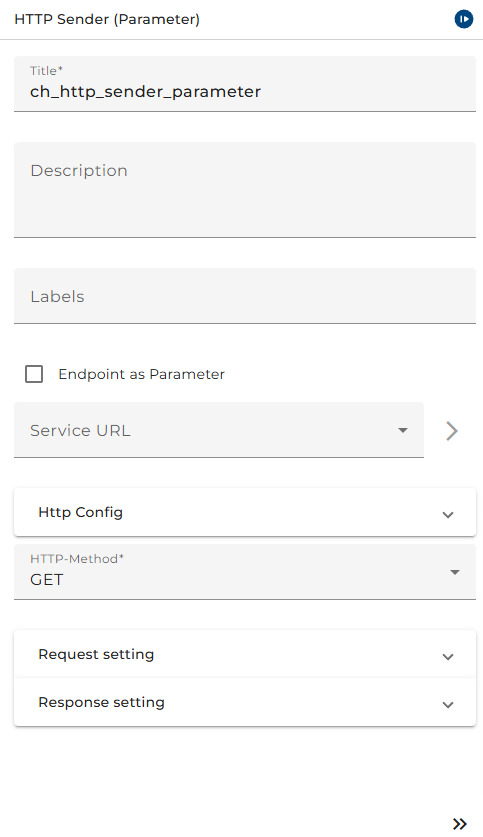
The dialog to configure the HTTP Sender(Parameter) looks like:
 |
|---|
| base view of the channel HTTP sender(parameter) |
Service URL: Choose an appropriate environment entry
-
Security
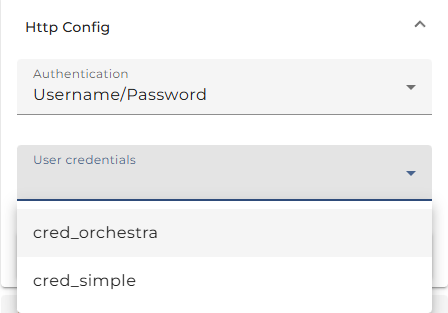
- Authentication here you may select an authentication type. You can select one of: No a uthorization required, Username/Password, Use preemptive authorization (Username/Password), Use certificate authorization or Use OAuth2.0 authentication . If you selected Use certificate authorization then the selected user credential must have PKCS#12 Key Pair. See Credentials for more information about user credentials, and key pairs. See also the best practice story Web Service Security in SOAP web service calls for more information about how to import a Key Pair.
OAuth can be used for authentication. First, a Json Web Token (JWT) is requested from an identity provider and appended directly to the actual request.
To use this feature, you must make the following configurations.
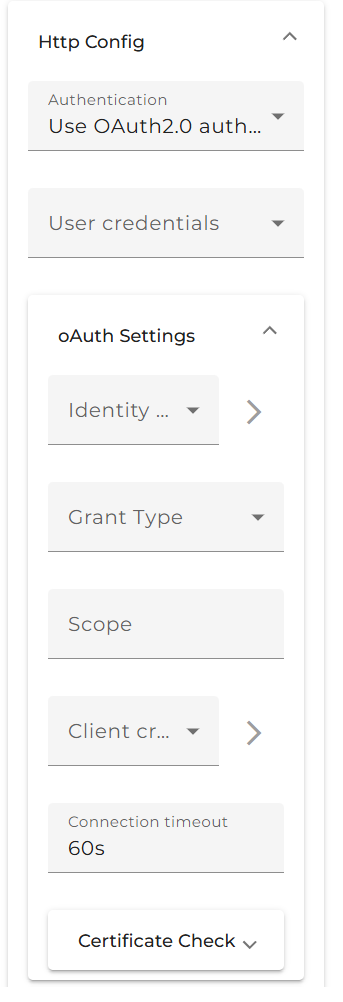
Currently, two different grant types are supported. Additional request parameters cannot be added to OAuth authentication at this time.
Grant Type:
-
Password-Grant: Is a way to exchange a user's credentials for an access token.
The following information is required and added to the token request:
Client-IdentifierClient-SecretUsernamePasswordIdentity Provider
The Identity Provider is a URL to a token endpoint.
The
Client-Identifierand theClient-Secretare base64-encoded and added to the request header and body as authentication.The
Usernameand thePasswordare added to the body. Currently, the same user credentials are used, which are also used for username/password authentication.
-
Client Credentials: Is used when applications request an access token to access their own resources, not on behalf of a user.
- Client Credentials (Header): Send
client-ID&client-Secretin the Request-Header. - Client Credentials (Body): Send
client-ID&client-Secretin the Request-Body.
The following information is required and added to the token request:
Client-IdentifierClient-SecretIdentity Provider
The Identity Provider is a URL to a token endpoint.
The
Client-Identifierand theClient-Secretare base64-encoded and added to the request header or body. - Client Credentials (Header): Send
-
User-Credentials:
A user with the same username and password as on the identity provider. The user type must be a "Technical login."
-
Identity-Provider:
Is a URL to a token endpoint of the identity provider (authorization server).
-
Client Credential:
Used to select user credentials with
Client-IdentifierandClient-Secretthat are relevant.-
Client-Identifier: Is the identifier of the user at the identity provider. It is located at the Identity Provider and is set up in Credentials Username/Password as "Account name."
-
Client-Secret: A secret generated by the identity provider. It is also located at the Identity Provider and is set up in Credentials Username/Password as "Password."
-
-
Certificate Check:
SSL-Settings or Identity-Provider access. This can be used if the Identity-Provider has an SSL connection and the certificate is a self-signed X509 certificate.
For setting configuration, use the certificate authentication as a reference.
-
User-Credentials a user credential of type Technical login. If you work with No authorization required you need no selection here.
The Certificate Check Panel allows a user to configure the client-side HTTPS connection details.
-
User-Credentials (type=Technical login): The public/private keypair in pkcs#12 format which should be used for authorization.
-
Trusted server (optional, type=Trusted server): This option allows checking the server's public key certificate which is presented by the server when the client makes a request.
-
Trusted signer (optional, type=Trusted server): Checks whether the server's certificate has been signed by the given certificate and thus can be trusted.
-
Check certificate chain (optional): Checks if the certificate chain is correctly signed (certificate
nis signed by certificaten + 1). -
Check validity (optional): If set, then checks if the certificate is expired.
-
Check signers against trust store: If set, then checks that the one certificate in the certificate chain (typically the last one) is contained in the trust store.
-
Cipher Suites (optional): Enforces specific Cipher Suites to be used in TLS. The cipher suites are added as comma-separated values in the text box (e.g.,
"TLS_ECDH_RSA_WITH_AES_256_CBC_SHA,TLS_ECDHE_RSA_WITH_AES_256_CBC_SHA,TLS_DHE_RSA_WITH_AES_256_CBC_SHA").
HTTP-Method: Transfer method:
- GET: The request will be assigned over HTTP GET (query string).
- POST: The request will be assigned over HTTP POST (body).
-
Request message: Choose a message type for the request message.
-
Optional Parameters: Additional parameters for HTTP.
-
Response message: Choose a message type for the response message.
-
De-Serializer: See deserializer for more information.
Parameters
| Parameter Name | Direction | Description |
|---|---|---|
ctrl_endpoint | Ingoing | This parameter is visible if you selected Endpoint as parameter. It is used to overwrite the target URL. |
ctrl_credential | Ingoing | This parameter is visible if you selected Use dynamic credentials. It is used to overwrite the used credential. |
DYNAMIC_SERVICE_URL | Ingoing | Optional parameter to overwrite the Service-URL environment entry. See EnvironmentEntryBuilder for details. |
MSG | Ingoing | Request message. |
MSG | Outgoing | Response message. |
See also
For special cases of HTTP invocations use the channel HTTP Post Sender, for general use HTTP Caller.
To accept HTTP invocations you can use the channels HTTP GET Receiver, HTTP POST Receiver (General) and HTTP POST Receiver (Parameter).